
Adobe Premiere Pro as Industry's Standard Video Editing Tool
Tool: Adobe Premiere Pro 2026
5/26/20262 min read
I’ve been creating videos since 2022 and I haven’t created any vlog about my favorite video editing tool which is Adobe Premiere Pro. Adobe Premiere Pro is the industry’s standard tool for video editing. Although there are popular alternatives nowadays like DaVinci or Capcut, I don’t think that they can really match the power of Adobe Premiere Pro.
If other video editing tools like DaVinci or CapCut claim that they are easy to use, Adobe Premiere Pro is easy to use as well. In fact, I never had formal training to learn Adobe Premiere Pro. I learned it when I was studying my masteral in Mapua University. One of the faculty named Paul Vitug taught me how to use it. I need to learn Adobe Premiere Pro that time because I need to compile my Adobe Flash (now Adobe Animate) files and add music. I am so thankful to that professor that I was able to submit the final project for my Videography class.
Back in 2019, I’m not a fan of videography. I’m a diehard graphic designer who doesn’t have any plan of leveraging my skills. However, when the plague of Covid19 locked everybody at home, the rise of vlogging and Tiktok spread as fast as Covid19. That’s the time I was convinced I needed to do videos. With Iphone6 and Adobe Premiere Pro, I started random videos from food to painting to travel to drawing. I also did solo travels so I can improve my videos. And when one of my clients asked me to edit videos, I was fully prepared. Since then, video editing has become part of my portfolio and now I am pursuing to be very good in videography.
For me GoPro and Adobe Premiere work hand-in-hand. Good video shots are very important and video editing can create a cinematic video and story. Adobe Premiere Pro has basic techniques to make your GoPro videos cinematic.
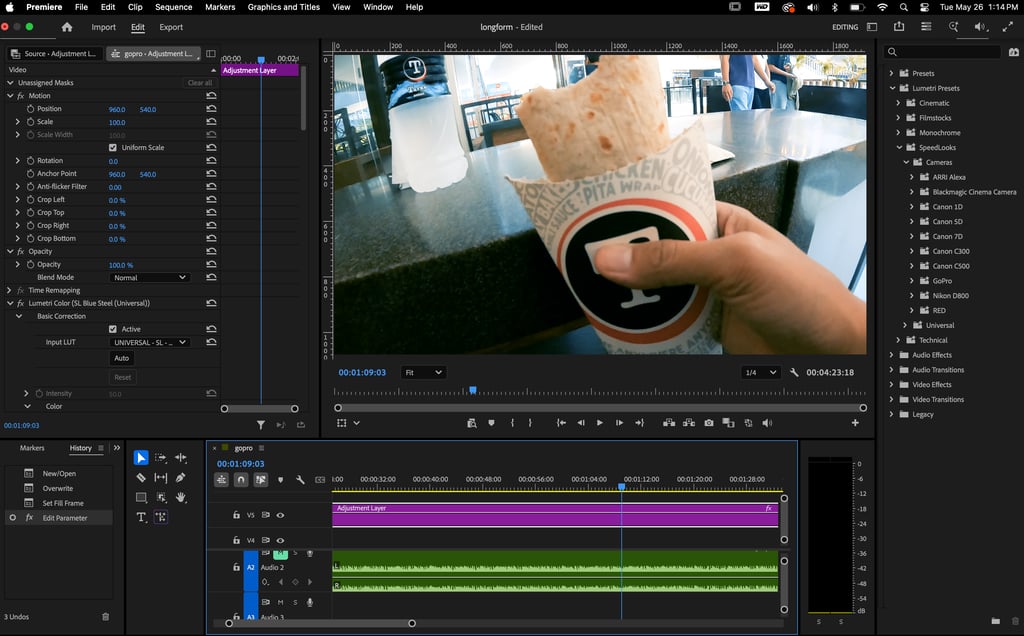
Adobe Premiere Pro 2026 Interface
Trimming the Sequence - enables you to remove the unnecessary parts of the video.
Lumetri Color > Cinematic - applies a vibrant or faded grainy effects.
Lumetri Color > Speed Labs - applies cool, warm, black & white color effects of different cameras like Canon. Nikon and GoPro
Video Transitions - creates playful transitions between videos
Audio - other than audio you can also add audios like voice overs, sound effects and background music.
These are the basic techniques you can easily learn from Adobe Premiere Pro. Once you master them, you are on your way to becoming a video editor and beyond.